Computer performance issues are often traced to hardware constraints, with studies from Microsoft’s Windows Performance Team documentation showing that system slowdowns frequently originate from memory pressure, storage bottlenecks, or thermal limits rather than software alone.
Modern computing environments depend heavily on stable processing cycles and balanced hardware loads. When one component struggles, the entire system can degrade in responsiveness. Technical discussions from D & D Electric highlight how engineering and field operations rely on consistent computing performance to avoid delays during diagnostics, system monitoring, and project coordination in complex infrastructure environments. These scenarios make hardware stability not just a convenience but an operational requirement.
Understanding why computers slow down requires more than identifying isolated symptoms. It involves building a diagnostic mindset that connects behavior, such as lag or overheating, to underlying hardware functions. By analyzing these relationships, users can better isolate root causes instead of applying surface-level fixes.
When Performance Drops Begin: Recognizing System Symptoms
Computers rarely slow down without warning. Early signs often include delayed application response, longer boot times, or sudden freezes during multitasking. According to Intel’s system architecture research notes, performance bottlenecks typically emerge when workload demand exceeds available processing or memory capacity.
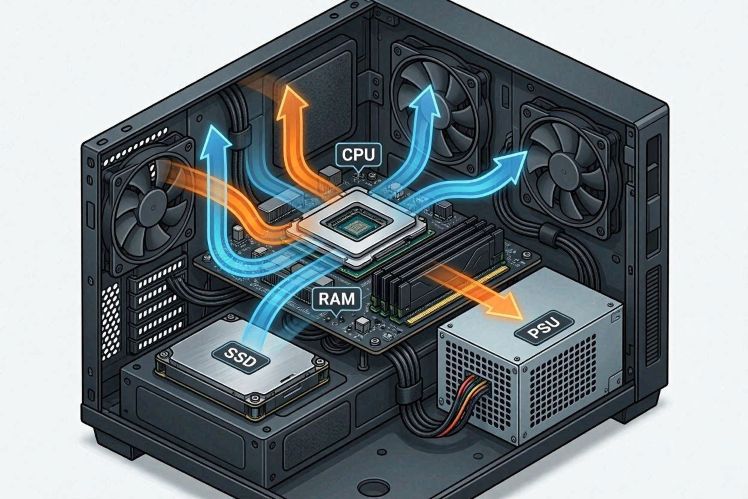
Lag, for example, is not a single problem. It can indicate CPU strain, insufficient RAM, or even storage latency. Overheating introduces another dimension, where thermal throttling forces the processor to reduce speed to protect internal components. Boot failure, on the other hand, often points to deeper hardware instability, including storage corruption or power delivery issues.
These symptoms form the starting point of a structured diagnostic process rather than isolated failures.
CPU Throttling and Processing Bottlenecks
The central processing unit (CPU) acts as the control center of a computer system. When it becomes overloaded, performance declines rapidly. Modern CPUs are designed with thermal protection features that reduce clock speed when temperatures exceed safe thresholds, a process known as throttling.
Research published by the IEEE Computer Society notes that thermal throttling is one of the most common causes of inconsistent system performance in consumer laptops and compact desktops. Dust buildup, poor ventilation, or aging thermal paste can all contribute to this issue.
From a diagnostic perspective, CPU-related slowdown usually appears during CPU-intensive tasks such as video editing, simulation, or running multiple applications simultaneously. If performance improves when the system cools down, thermal throttling is a likely cause.
Insufficient RAM and Memory Pressure
Random Access Memory (RAM) plays a critical role in temporary data storage. When RAM is insufficient, systems begin relying on virtual memory stored on slower disk drives, which significantly reduces performance.
According to analysis from Kingston Technology, memory saturation is one of the leading contributors to system lag in multitasking environments. Users often experience this as delayed switching between applications or freezing during heavy browser usage.
Diagnostic thinking suggests observing memory usage patterns. If RAM consistently reaches near full capacity during normal tasks, upgrading memory or optimizing background processes becomes necessary. Unlike CPU throttling, RAM limitations typically remain consistent regardless of system temperature.
Storage Bottlenecks: HDD vs SSD Performance Differences
Storage devices also play a major role in system responsiveness. Traditional hard disk drives (HDDs) rely on mechanical movement, which limits read and write speeds. Solid-state drives (SSDs), by contrast, use flash memory and provide significantly faster data access.
Data from Samsung Semiconductor research shows that SSDs can reduce boot times and application loading speeds by several factors compared to HDDs. This difference becomes especially noticeable in systems running modern operating systems that require frequent data retrieval. Beyond storage speed, system performance is also influenced by overall power design and device architecture, as discussed in energy efficiency differences between desktops and laptops, where hardware efficiency plays a key role in sustained computing performance across different device types.
A common diagnostic clue is slow startup or delayed file access even when CPU and RAM usage appear normal. In such cases, the storage device becomes the primary bottleneck in the system pipeline.
Power Supply Instability and Unexpected System Failures
The power supply unit (PSU) is often overlooked, yet it is essential for stable operation. When power delivery becomes inconsistent, systems may shut down unexpectedly or fail to boot entirely.
Hardware engineering references from Corsair’s PSU reliability guidelines emphasize that voltage fluctuations or insufficient wattage can lead to unpredictable system behavior, particularly under load.
Diagnostic indicators of PSU issues include random restarts, failure to power on, or crashes during high-performance tasks. Unlike software-related errors, these symptoms tend to appear abruptly and without warning patterns.
Building a Diagnostic Thinking Model
Rather than reacting to individual symptoms, a structured diagnostic approach allows users to map problems to specific hardware layers. This model begins with observation, followed by isolation of conditions, and finally validation through testing.
For example, if a system slows down only under heavy workload, CPU or RAM constraints are likely. If slowdowns occur during file access, storage becomes the primary suspect. If instability appears during power-intensive tasks, PSU performance should be evaluated.
This layered thinking approach is widely used in technical environments where downtime must be minimized. Field engineering teams, such as those referenced in operational contexts by D & D Electric https://dndenergy.com, depend on stable computing systems to ensure uninterrupted diagnostics, scheduling, and infrastructure monitoring. In such settings, even minor performance degradation can affect workflow efficiency and decision accuracy.
Conclusion: Understanding Performance as a System Balance
Computer slowdowns rarely stem from a single cause. Instead, they reflect an imbalance within interconnected hardware components. CPU performance, memory availability, storage speed, and power stability all work together to determine system responsiveness.
Experts in system engineering consistently emphasize that maintaining balance across these components is more effective than addressing isolated issues. Whether in personal computing or professional environments that rely on dependable digital tools, performance stability remains essential for productivity and operational continuity.
By adopting a diagnostic mindset, users can move beyond surface-level troubleshooting and develop a clearer understanding of how hardware behavior shapes overall computing performance. This approach leads to more accurate decisions, better maintenance practices, and longer system lifespan.